
Iris can now get you your next job
Iris was built so that once you set it up, you can relax and be sure you're not missing anything important. For a lot of people that includes new career opportunities, so Iris can now watch for newly posted jobs that match you.
No more scrolling through generic job boards. New roles that fit you turn up after the stories in your normal briefing.
How it works:
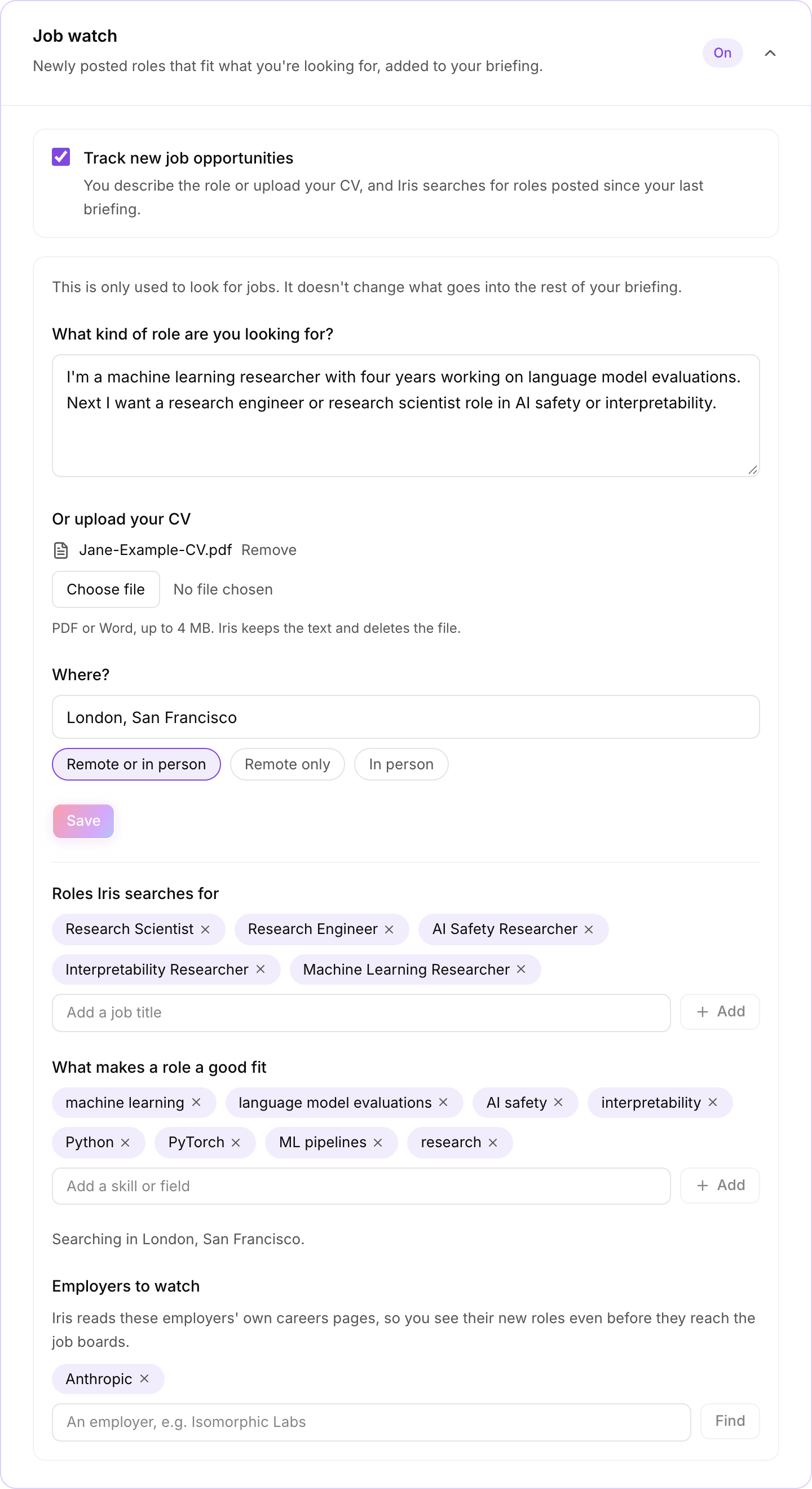
- Upload your CV, or describe the role you want in a few sentences. Iris keeps the text and deletes the file.
- Say where: up to three places, and whether you want remote, in person or either.
- Iris turns that into the job titles and skills it searches for. You can add or remove any of them.
- Each briefing lists up to five new roles posted since your last one, with the employer, location and date posted. You never see the same role twice.
- If there are companies you'd love to work for, add them under Employers to watch. Iris reads their own careers pages, so you see their new roles before they reach the job boards.
Your job profile is kept apart from the rest of your setup. It's only used to look for jobs and doesn't change anything else in your briefing.
The job watch is on every plan and off by default. To turn it on, go to Configuration on your dashboard and open Job watch.
This one was asked for by our readers, so we built it. If there's anything else that would make Iris work better for you, let us know.